怎么赢
每个关卡都有固定的敌人路线、可建造区域、障碍物和多波敌人。用金币购买炮塔、选好位置、清理障碍、合成升级并释放技能,守住终点生命值撑过所有波次即可过关。过关后解锁下一关,还可以回头追求完美通关。
核心规则
- 炮塔只能放在路线旁的建造格,路线格不能建造。
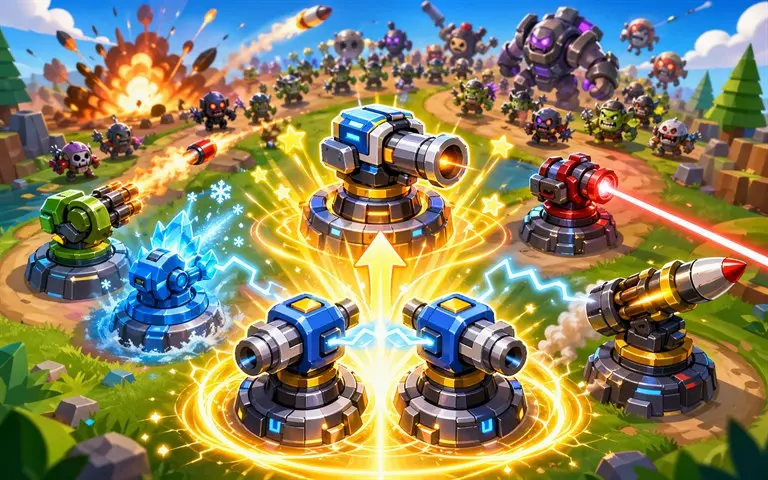
- 把同类型、同等级的两座炮塔拖到一起,会合成一座更高等级的炮塔。
- 障碍物占着部分建造位,清理后能拿到金币并空出新位置。
- 敌人分为普通、快速、装甲、分裂、干扰、空中和首领等类型,需要不同炮塔应对。
炮塔怎么搭配
炮弹塔稳定处理普通目标;激光塔擅长持续输出;迫击塔用范围伤害清理成群敌人;冰霜塔减速,让整条路线的火力多打几轮;导弹塔负责空中单位和需要快速集火的目标。面对装甲、分裂或首领时,“范围伤害 + 持续输出 + 控制”的组合通常比堆单一塔型更稳。
新手建议
- 先让路线前、中、后段都有火力,再集中升级单个位置。只守入口容易漏掉快速或分裂的敌人。
- 每波开始前留一些金币,用来应对突然出现的空中或装甲单位。
- 优先清理能打开关键建造格的障碍,不是每个障碍都值得开局就清。
- 合成前确认两座炮塔类型和等级一致。不同塔拖在一起不会升级,还可能打乱原本的覆盖范围。
操作方式
- 电脑:点商店里的炮塔,再点空地放下;把鼠标停在炮塔上可以查看伤害、射速和射程。按住炮塔拖到同类同级的炮塔上就能合成,也可以点一下拿起、再点一下放下。
- 手机:从底部商店把炮塔拖到地图上,需要横屏游玩。
- 画面:默认是 3D 战场,五个章节各有自己的场景。设备较旧或想省电时,可以在菜单里把“画面”切换成经典 2D。
语言、通关进度、静音和画面设置都保存在当前浏览器里。
常见问题
为什么手机上提示旋转屏幕?
战斗地图需要同时显示路线、建造位和底部操作区,所以手机端以横屏为准。旋转后仍没有切换时,请刷新页面,并确认系统没有锁定屏幕方向。
进度保存在哪里?
战役进度、语言和静音设置保存在当前浏览器的本地存储中。清除网站数据、使用无痕模式或换设备后,进度不会自动同步。
支持哪些浏览器?
建议使用最新版 Chrome、Edge、Firefox 或 Safari。游戏依赖 Canvas 和 JavaScript;关闭脚本时仍能阅读本页,但无法开始战斗。
版本说明
当前公开版本包含 50 个战役关卡。2026-10 的更新把战场换成了 3D:炮塔和敌人都有立体模型,炮弹、激光、迫击炮弧线和技能都有光效,菜单背景会展示所选章节的实时场景;同时加入了电脑端拖拽合成和悬停查看炮塔属性。
游戏程序、界面与文字由 GameHangar 独立制作,不包含第三方商业游戏文件。
How to win
Every stage has a fixed enemy route, build spots, obstacles and several waves. Spend gold on cannons, pick their positions, clear obstacles, merge upgrades and fire skills to keep your base alive through every wave. Clearing a stage unlocks the next, and you can return for a perfect clear.
Core rules
- Cannons go on build tiles beside the route; route tiles cannot be built on.
- Drag two cannons of the same type and level together to merge them into one of the next level.
- Obstacles block some build tiles. Clearing them pays gold and frees the space.
- Enemies include regular, fast, armored, splitting, disrupting, flying and boss units, and each calls for a different answer.
Matching towers to enemies
Cannon towers handle regular targets steadily; lasers deal sustained damage; mortars clear clusters with splash damage; frost towers slow enemies so the whole route gets more shots; missile towers cover flying units and burst down priority targets. Against armor, splitters or bosses, a mix of splash, sustained damage and control holds better than stacking one tower type.
Tips for new players
- Cover the start, middle and end of the route before upgrading one spot. Defending only the entrance lets fast and splitting enemies slip through.
- Keep some gold back before each wave for surprise flying or armored units.
- Clear the obstacles that open key build tiles first; not every obstacle is worth clearing early.
- Check that two cannons match in type and level before merging. Mismatched towers will not upgrade and can break your coverage.
Controls
- Desktop: pick a cannon in the shop, then click an empty tile to build it. Hover over a cannon to see its damage, fire rate and range. Press and drag a cannon onto a matching one to merge, or click once to pick it up and again to drop it.
- Phone: drag cannons from the shop onto the map, in landscape.
- Graphics: battles are shown on a 3D battlefield with its own scenery in each of the five chapters. On older devices, or to save battery, switch Graphics to classic 2D in the menu.
Language, campaign progress, sound and graphics settings are saved in your browser.
FAQ
Why does my phone ask me to rotate?
The battle map has to show the route, build tiles and controls at once, so phones play in landscape. If the game does not switch after rotating, reload the page and check that rotation lock is off.
Where is my progress saved?
Campaign progress, language and mute settings live in this browser's local storage. Clearing site data, private browsing or switching devices will not carry them over.
Which browsers work?
Use a current version of Chrome, Edge, Firefox or Safari. The game needs Canvas and JavaScript; with scripts off you can read this page but not start a battle.
Version notes
The public version has 50 campaign stages. The October 2026 update moved battles onto a 3D battlefield: towers and enemies are full 3D models, shots, lasers, mortar arcs and skills light up, and the menu shows a live view of the selected chapter. Desktop players can now drag to merge and hover over a cannon to inspect it.
The game code, interface and text are made by GameHangar and contain no third-party commercial game files.